Spike
Spike Teamspace Admin
The Admin settings let team ownersmanage their teamspace
Web · UX/UI · 2023
Company Background
Collaborative email platform
Spike is a collaborative email platform that transforms email into a chat-like experience. It brings multiple email accounts into a single interface, enables team collaboration through shared workspaces, and integrates AI tools to support writing and message organization.
The Teamspace Admin let team owners manage their teamspace, including members, billing, email domains, and shared inboxes like email or WhatsApp for collaborative task management.
The Problem
Introducing Admin Controls
Team owners need a clear and intuitive way to manage team members, subscriptions, and shared resources. Without a dedicated admin interface, these tasks can become cumbersome, error-prone, and fragmented across different parts of the platform.

Competitive Research
Admin Management Patterns
To validate the need for an Admin Panel, we reviewed how Google Workspace and Figma manage teams and workspaces.

Google workspace
Strength
- Centralized Admin Console for organization wide control.
- Strong role hierarchy (Admin, Super Admin).
- Integrated billing and domain management.
Weakness
- Complex for new users.
- Requires training for non-technical admins.
- Previously called Groups, naming can confuse users.

Figma
Strength
- Simple and intuitive team creation.
- Easy member invitations.
- Tiered admin levels.
Weakness
- Billing management less centralized.
- Domain management not included.
- Scaling for large organizations may need extra admin planning.
Key Insights
Summary of Learnings
01
Teamspace Requirement
A dedicated admin panel gives team owners clear control over members, billing, and teamspace resources.
02
Groups Naming Confusion
The ‘Groups’ feature in Google Workspace lacks clarity, as it doesn’t clearly signal a shared inbox.
03
Visibility Issue
Groups in Google Workspace are hidden under the Directory tab, limiting visibility and clarity.
04
Home screen
Figma lacks a centralized home screen to consolidate all admin cards and information in one place.
Solution Overview
Admin panel

Team Members
Team members are managed through a dedicated Members section, where the owner or admin can invite new members, remove existing ones, and control access within the teamspace.

Billing & Subscriptions
Billing and subscription management are handled in a single Billing area. From there, the owner or admin can purchase or upgrade plans, manage invoices, and oversee all billing-related settings without leaving the Admin Panel.

Shared Inbox
The owner or admin can create or connect a shared inbox, which generates a new shared email address. Once created, the inbox can be accessed by collaborators pulled directly from the teamspace, enabling teams to manage support or sales communication from one shared location.
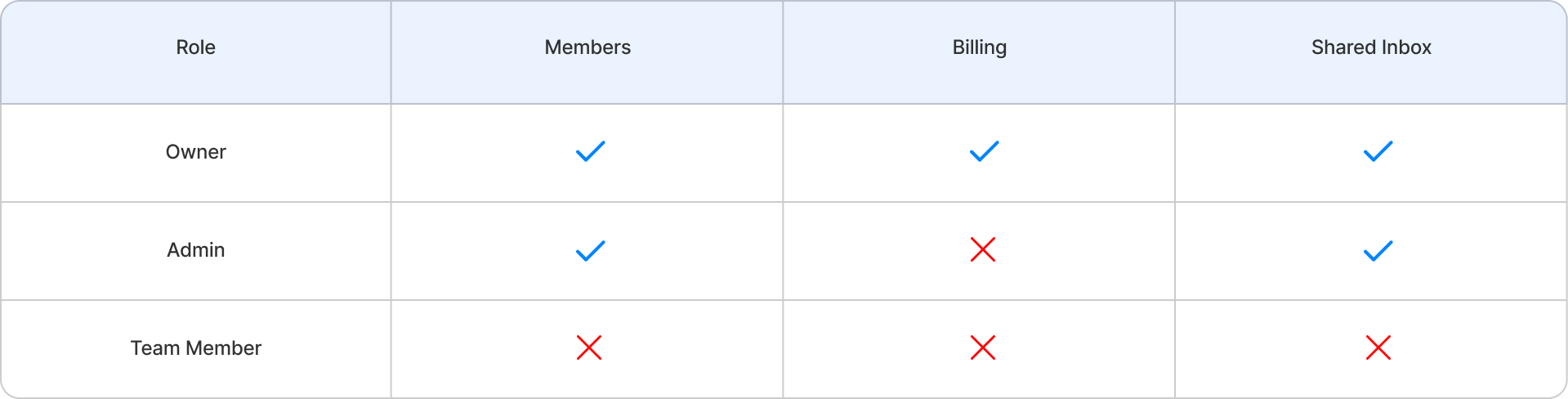
Role & Permission
Introducing Admin Management
Defining who has control and who doesn’t.
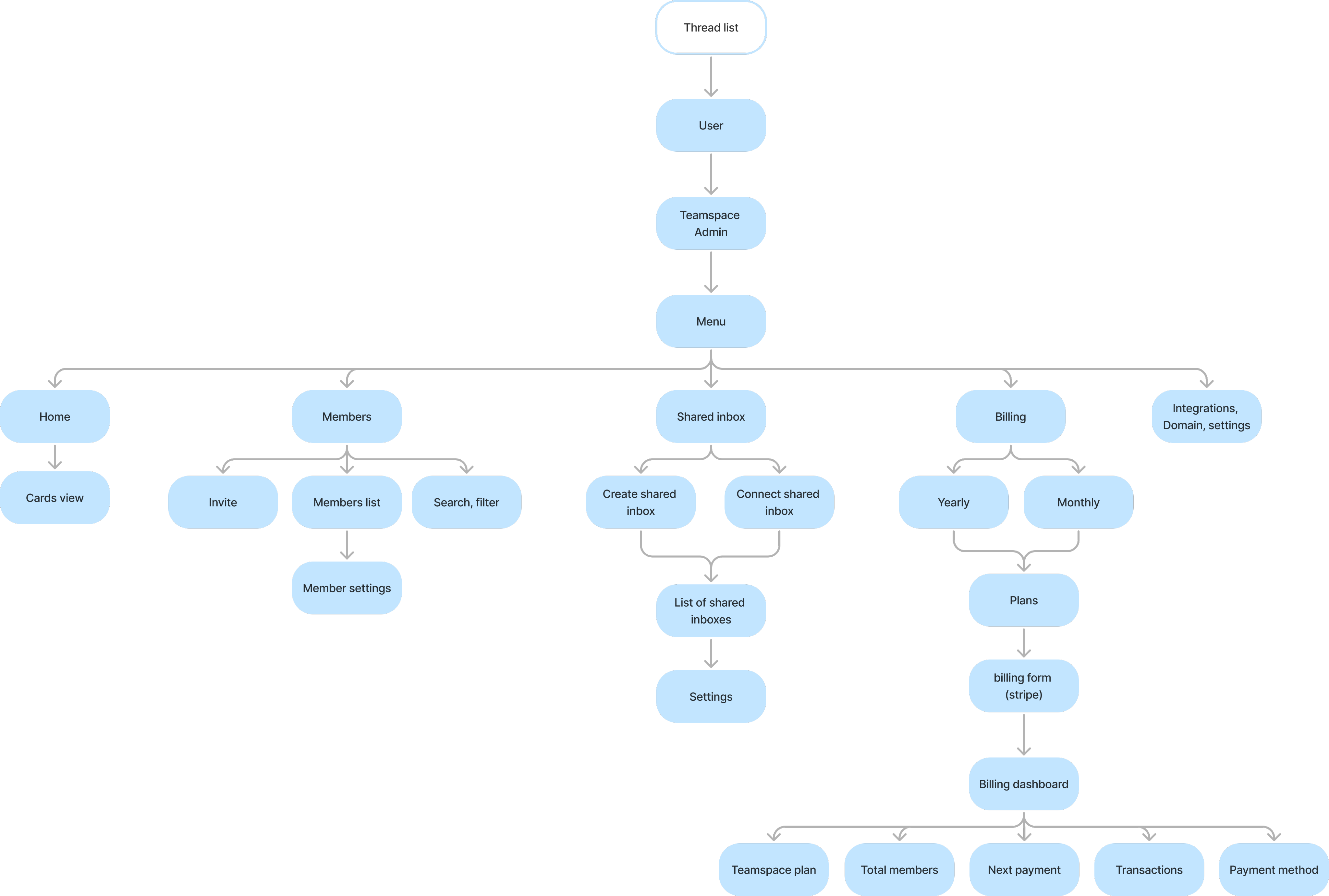
Flowchart
I made a flowchart to help the team and me better understand the flowand how it will work.
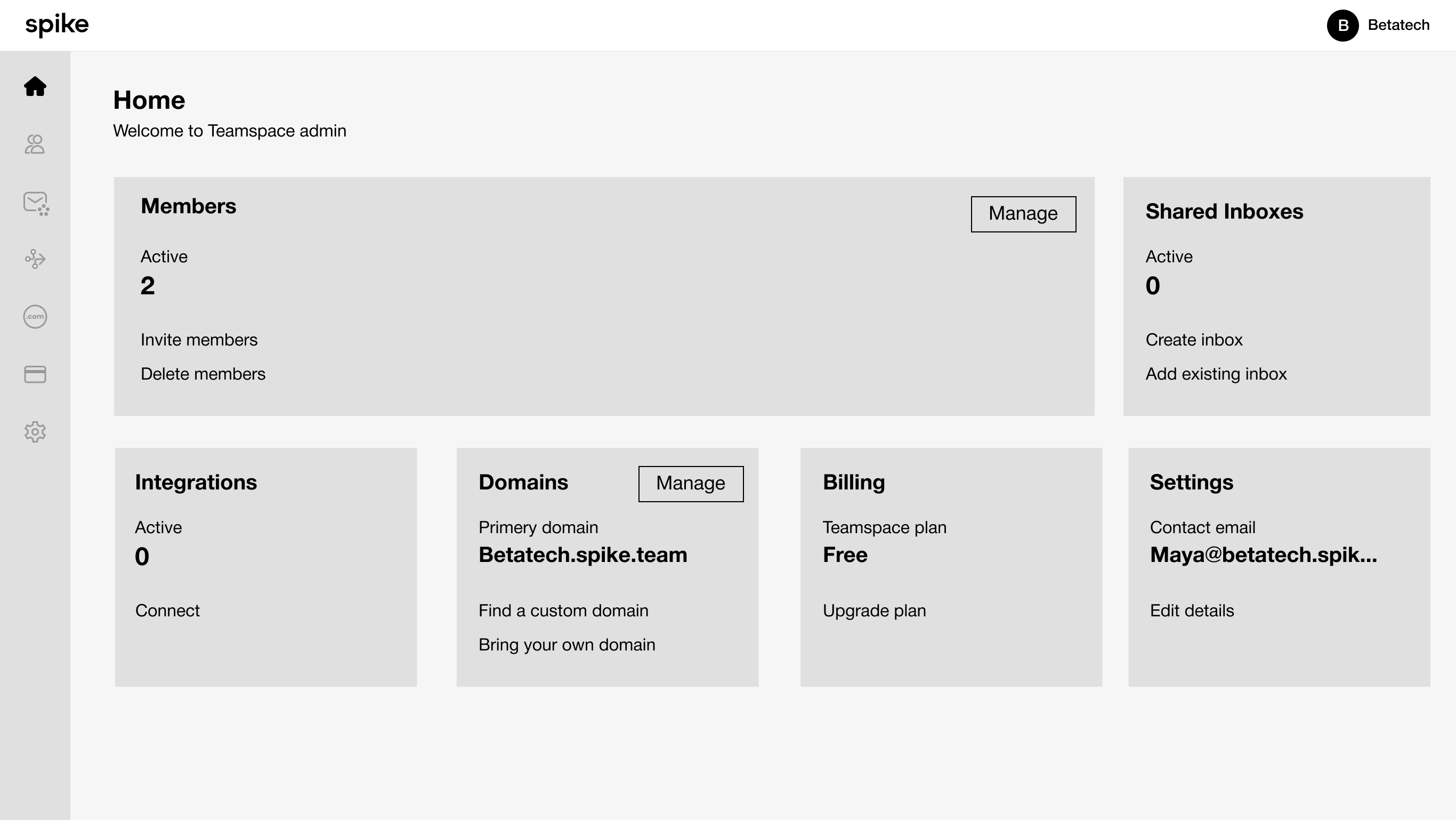
Wireframes
Home page layout
We created the admin experience to help users manage their teamspace, and I designed several examples to illustrate how it works.
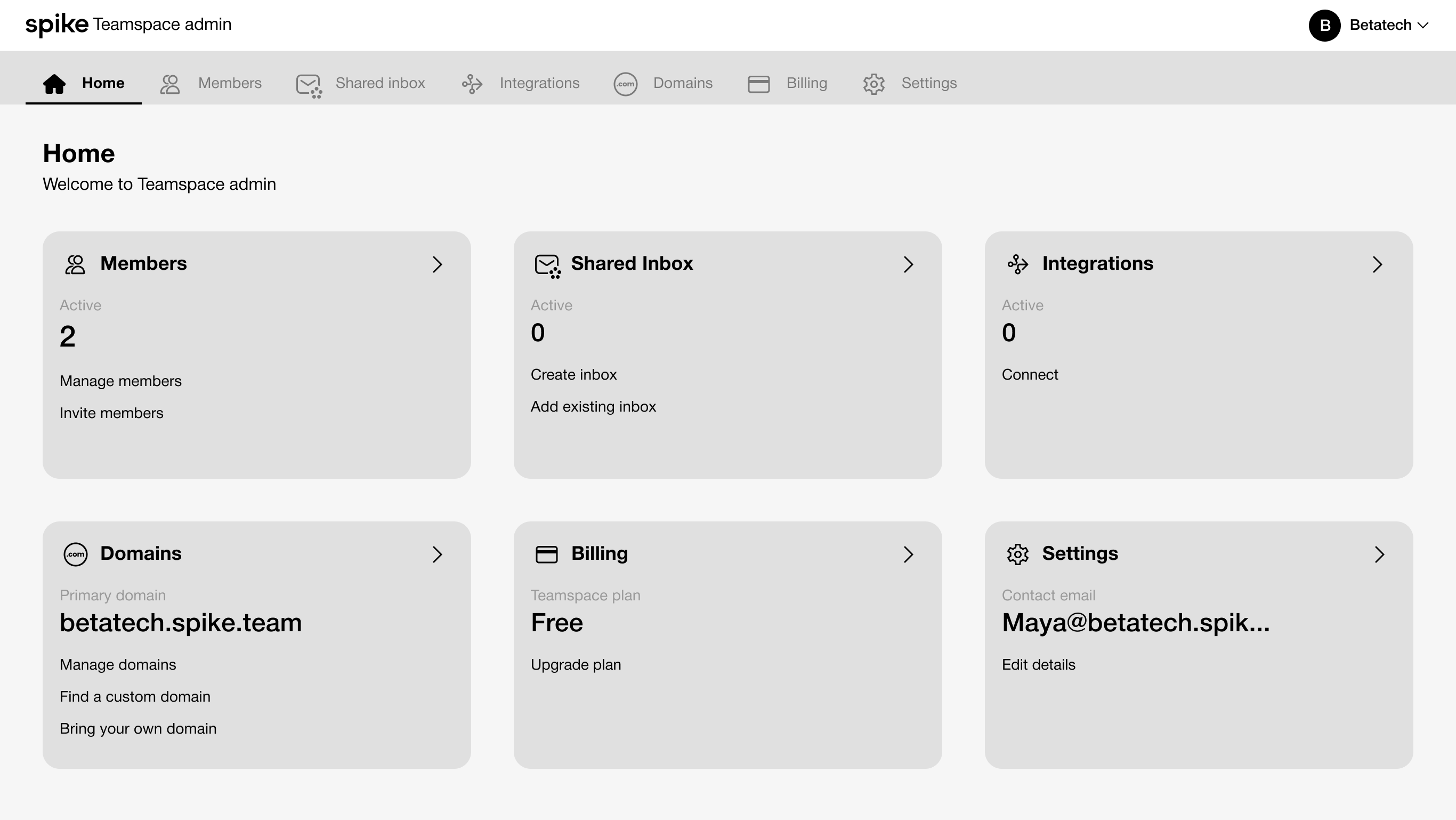
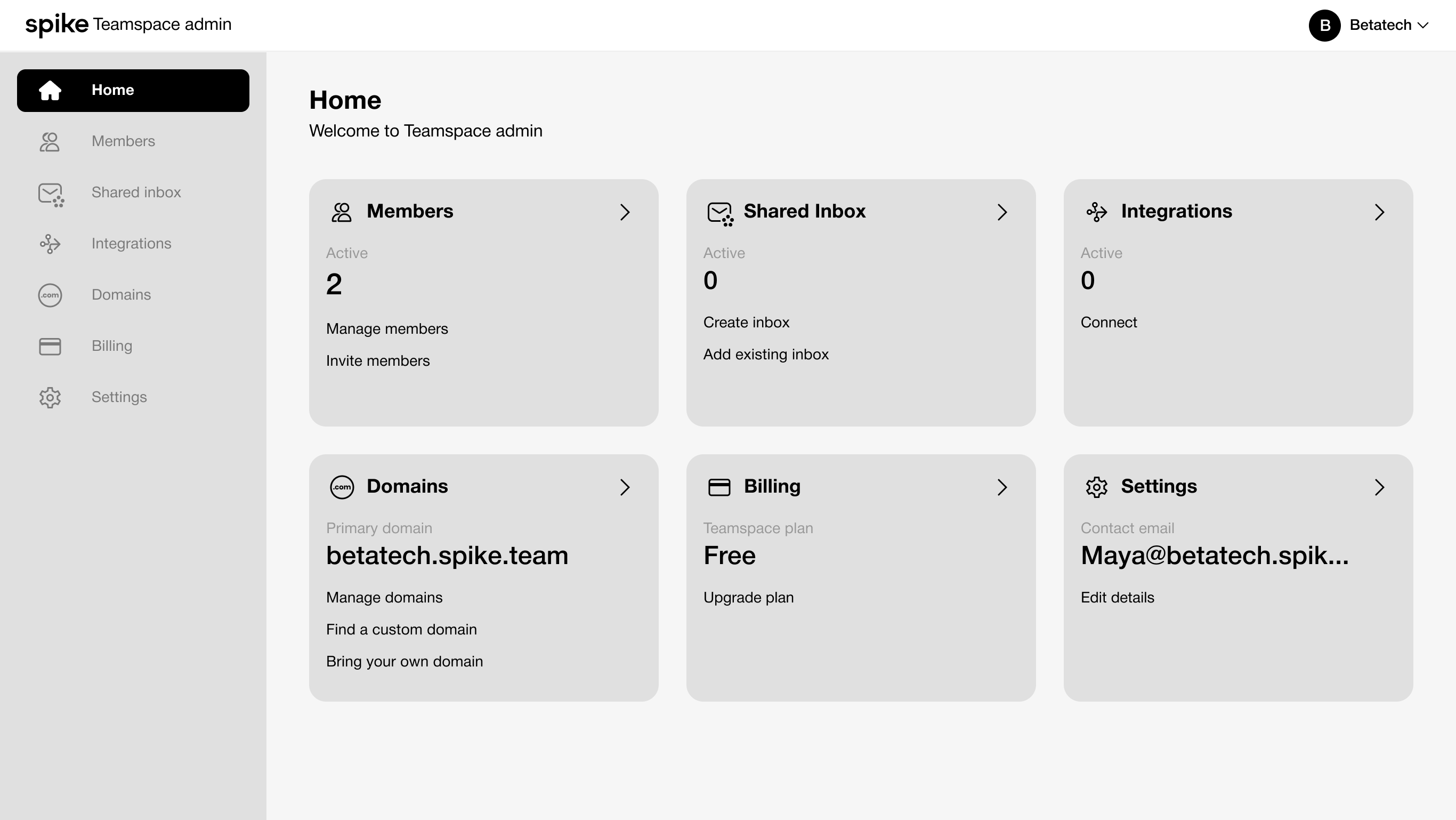
Selected layout
The Cards make it easy to see what’s set up and what needs attention at a glance.The left-side navigation mirrors this structure, making movement between sections simple and intuitive
Design
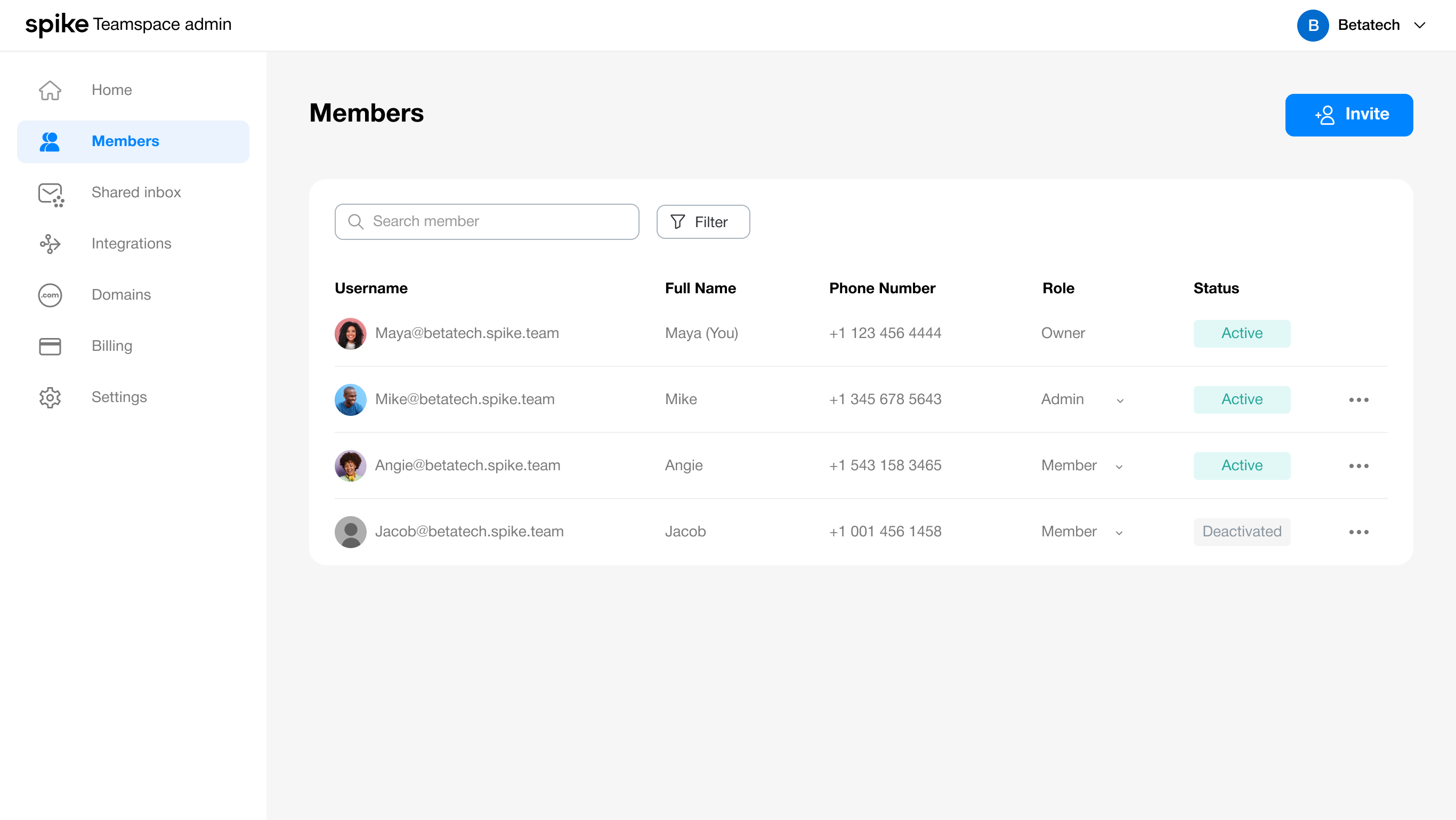
Manage Members
The Members tab was created to enable owners and admins to efficiently add or remove team membersand update their roles, ensuring proper access and responsibilities within the team.
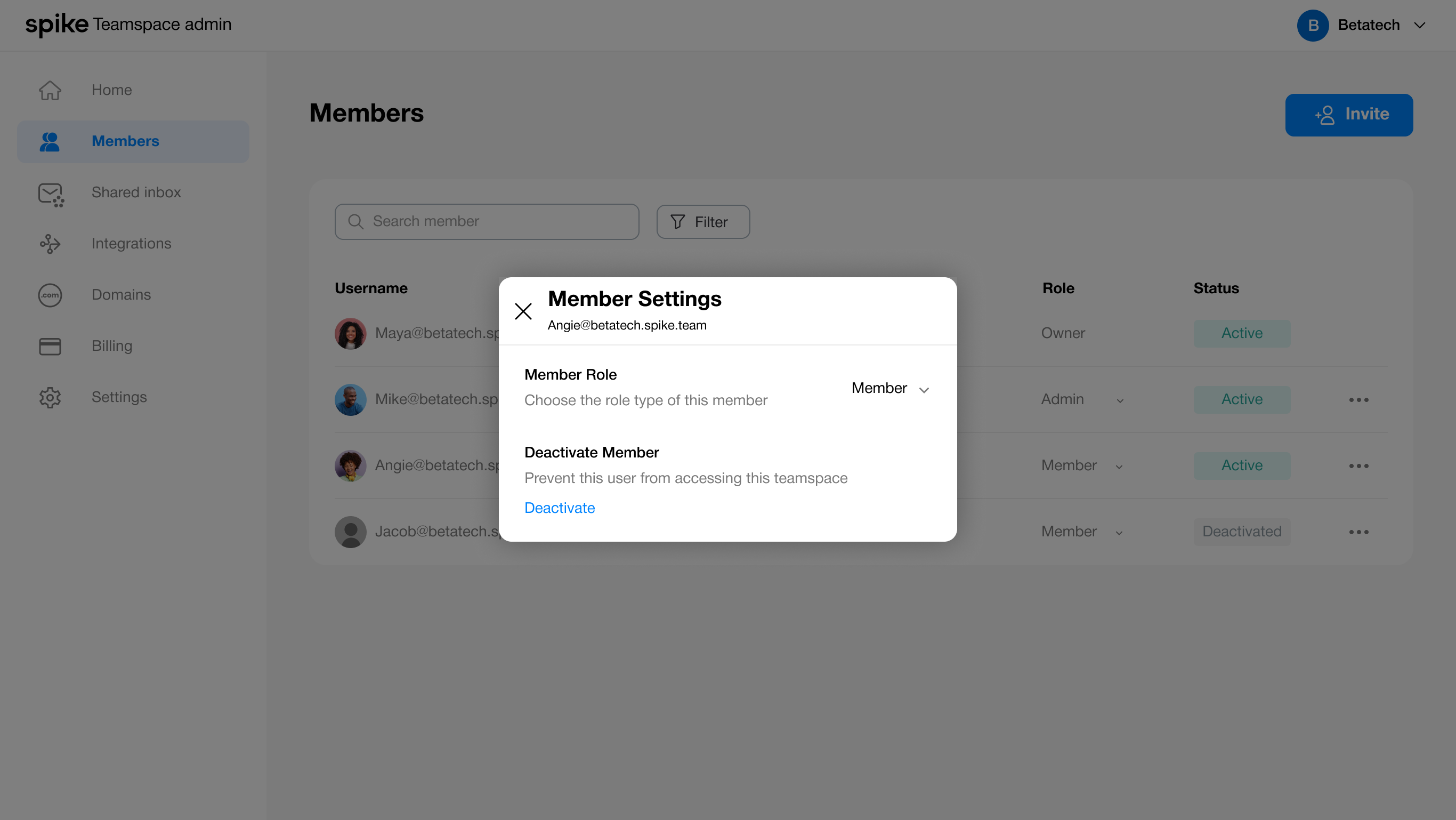
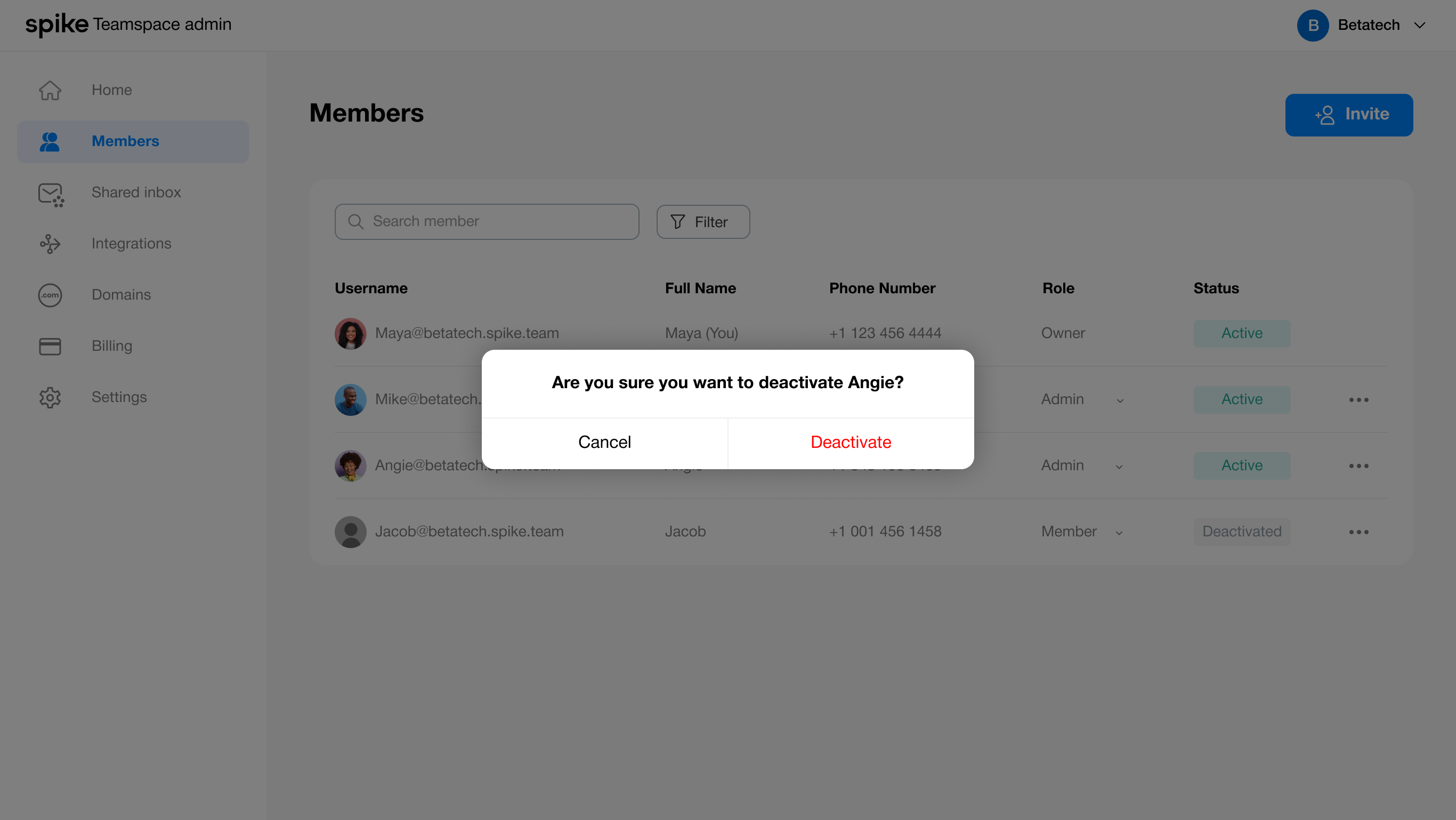
Member settings
Owners and admins can deactivate a member by accessing the settings modal through the three-dot menu
Billing & Subscriptions
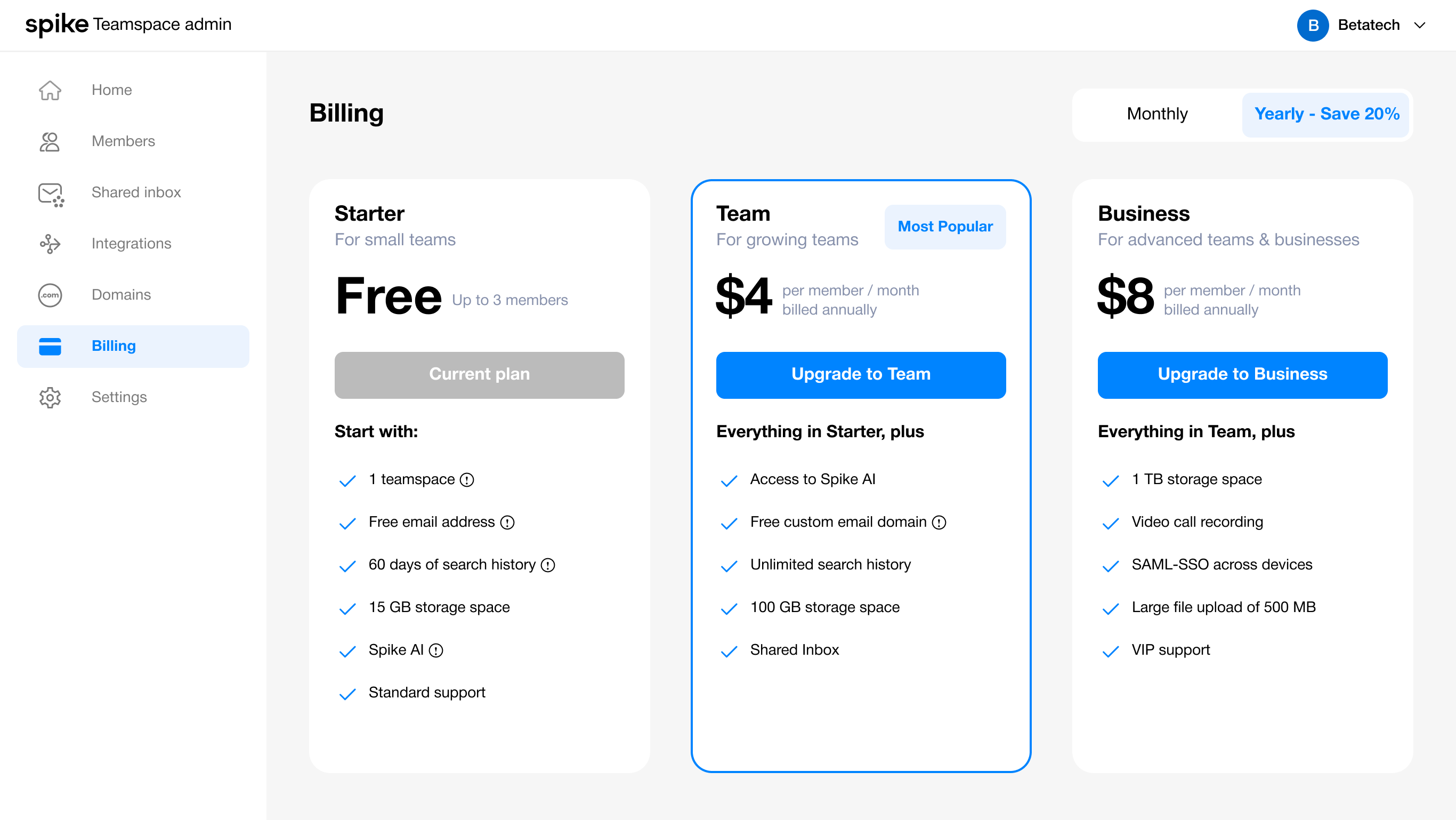
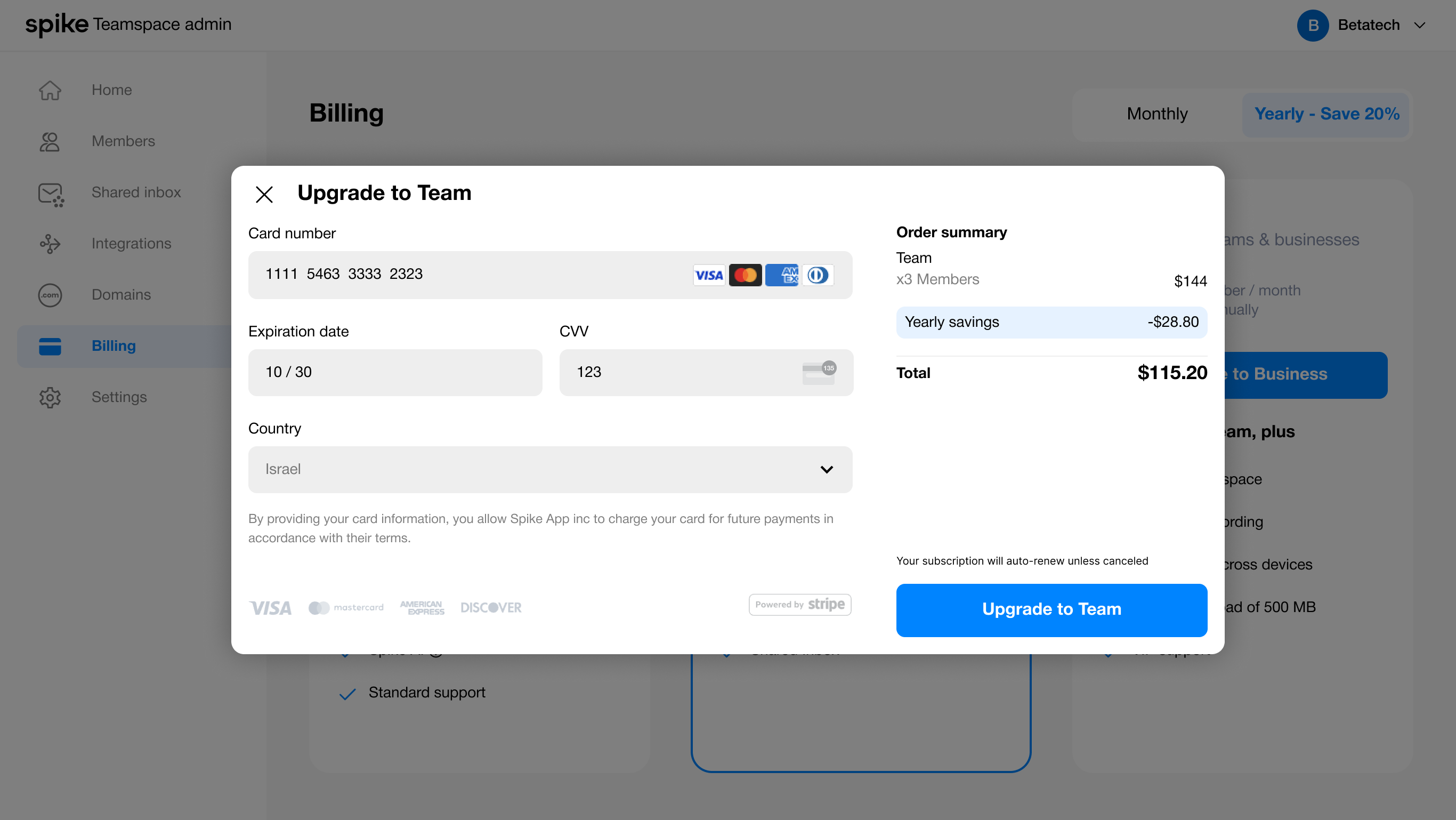
The free plan allows up to three members. Once that limit is reached, users are prompted to upgrade, with payments processed through a Stripe iframe. I also highlighted the most popular plan to encourage upgrades and support a core business KPI.
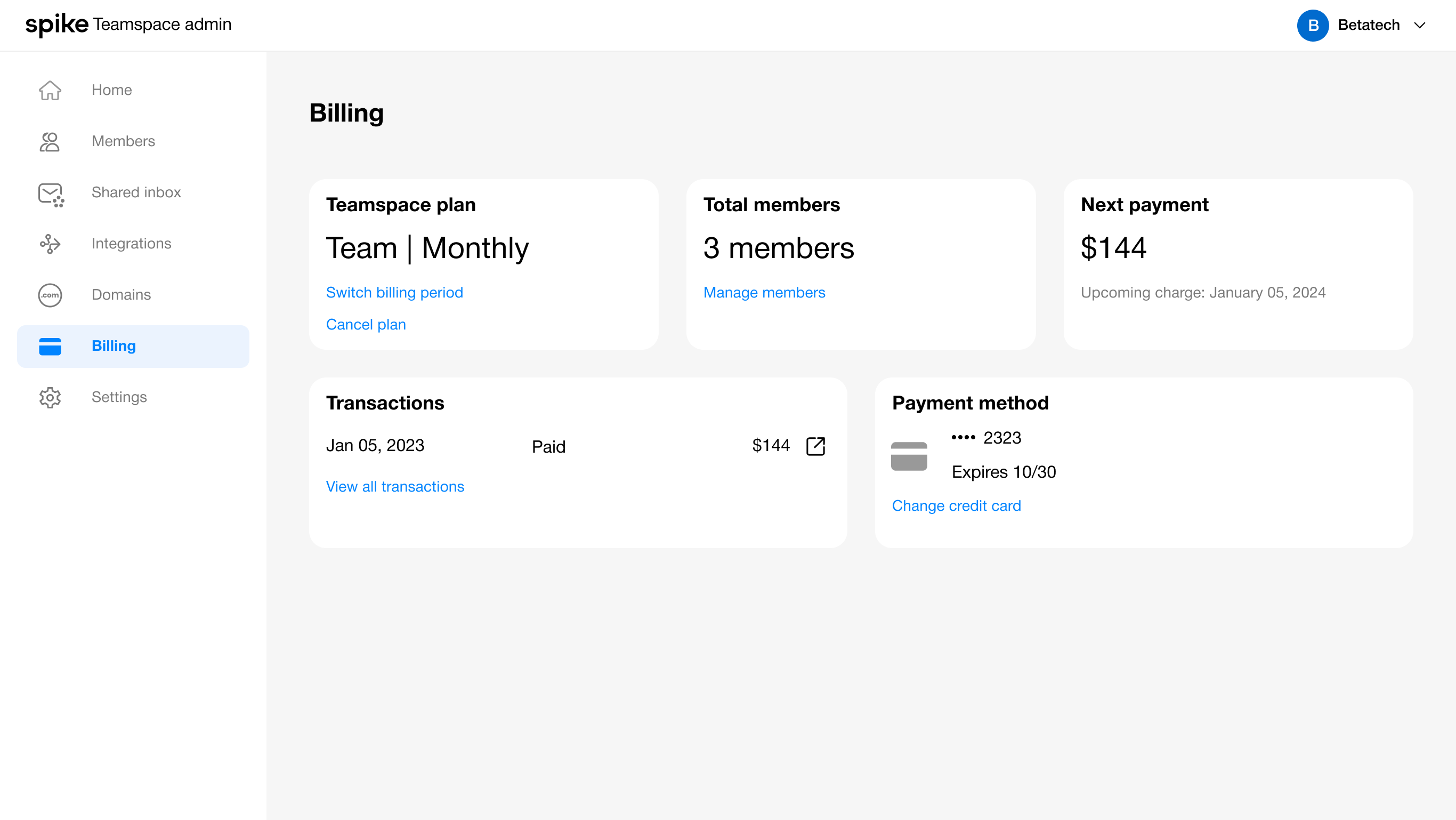
Billing after subscription activation
Once a user has subscribed, they can manage their subscription, cancel it if needed, and view or update payment details.
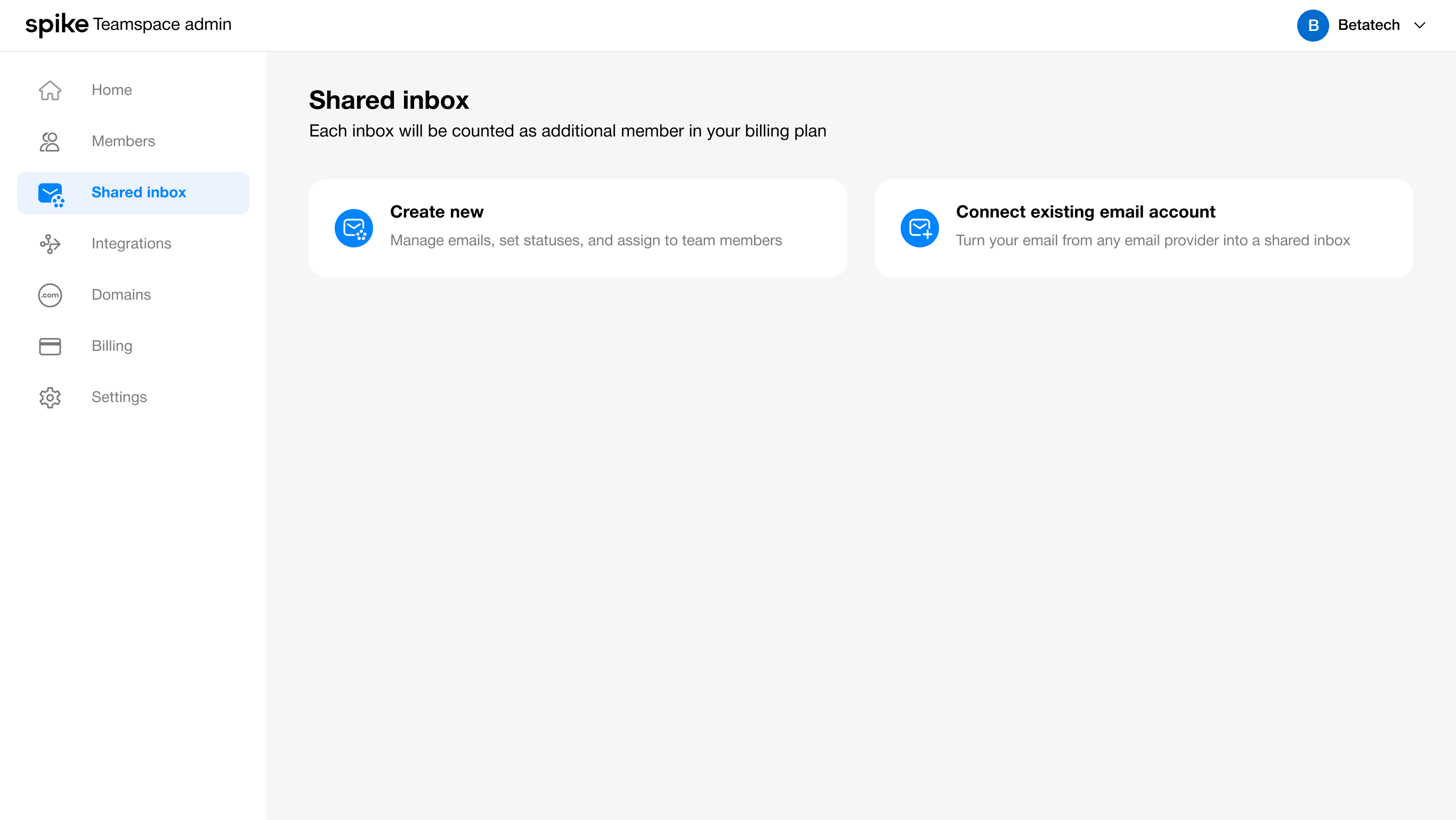
Shared inbox
Within the Shared Inbox tab, Owners/Admins can either create a new shared inbox or connect one from an external provider.
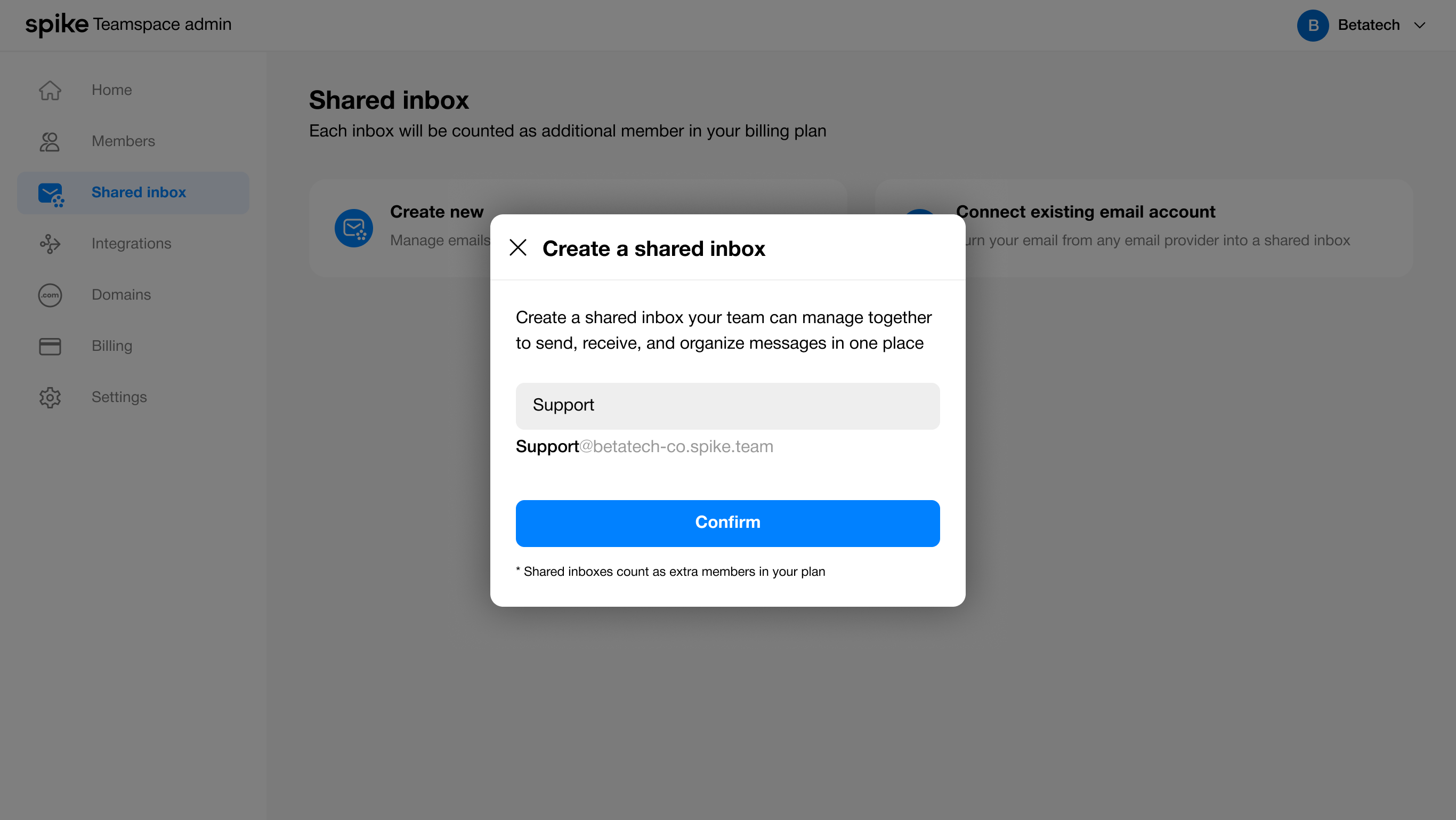
Add collaborators
Once a shared inbox is created, the user can add collaborators from their team. The team owner is added by default, but participation in the inbox is optional.
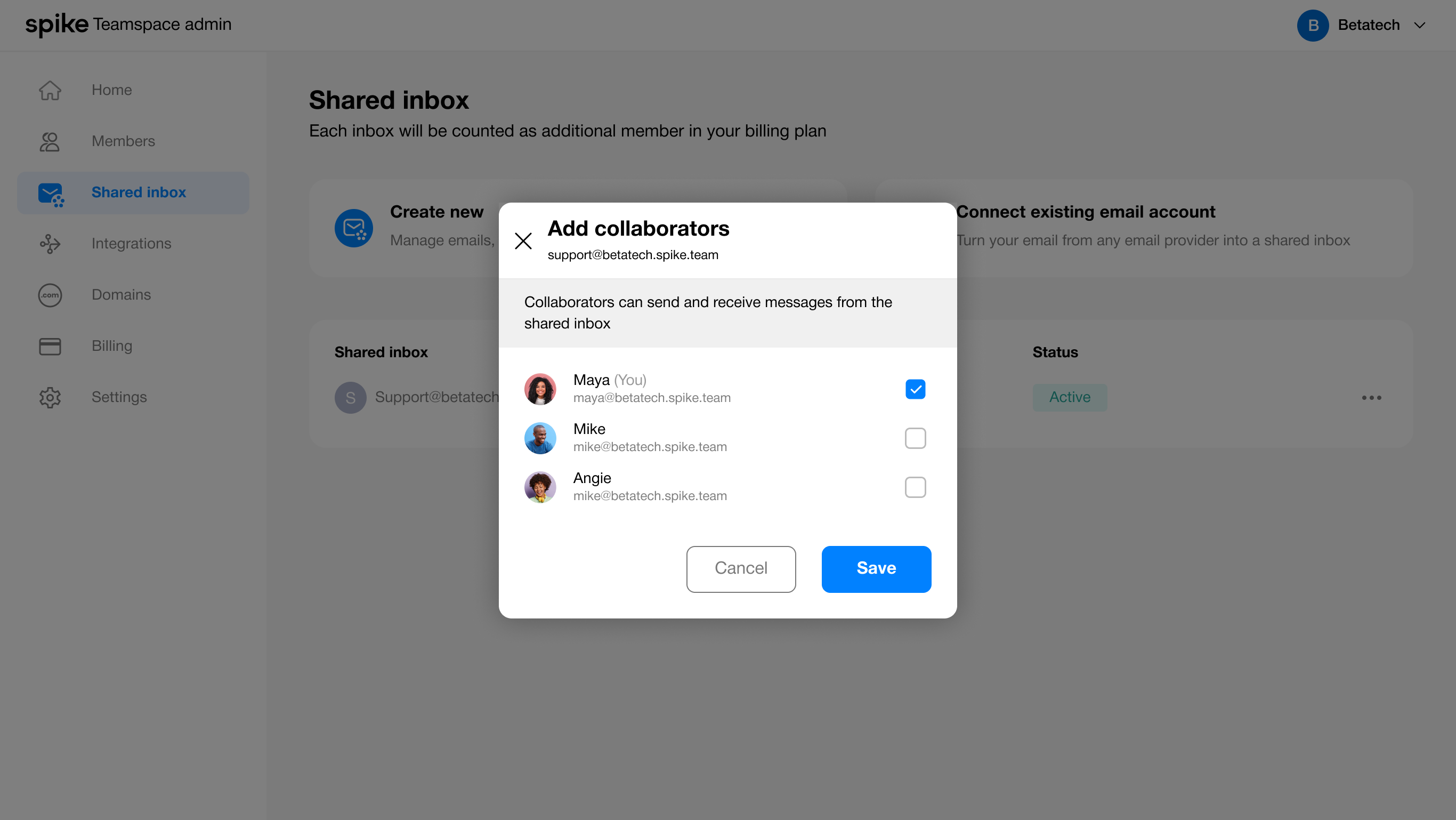
Managing Shared Inboxes
After the Owner/Admin adds a shared inbox, they can fully manage and use it to collaborate with their team. This includes adding or removingcollaborators, assigning tasks, and overseeing messages. Additionally, they can create new shared inboxes or connect existing ones from otherproviders, giving the team flexibility to manage multiple communication channels efficiently.
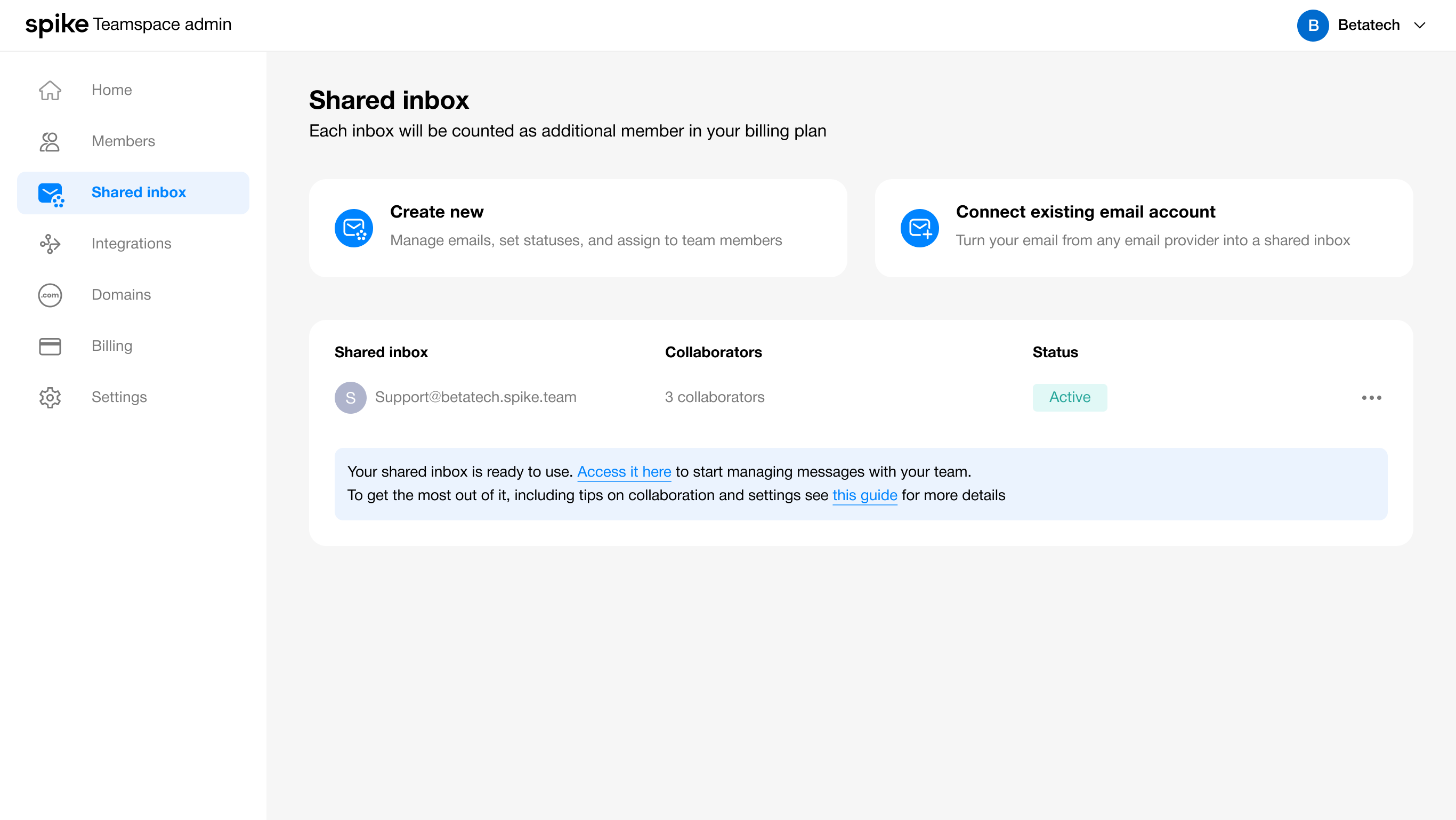

Spike
Spike Teamspace Admin
The Admin settings let team owners manage their teamspace
Web · UX/UI · 2023
Company Background
Collaborative email platform
Spike is a collaborative email platform that transforms email into a chat-like experience. It brings multiple email accounts into a single interface, enables team collaboration through shared workspaces, and integrates AI tools to support writing and message organization.
The Teamspace Admin let team owners manage their teamspace, including members, billing, email domains, and shared inboxes like email or WhatsApp for collaborative task management.
The Problem
Introducing Admin Controls
Team owners need a clear and intuitive way to manage team members, subscriptions, and shared resources. Without a dedicated admin interface, these tasks can become cumbersome, error-prone, and fragmented across different parts of the platform.

Competitive Research
Admin Management Patterns
To validate the need for an Admin Panel, we reviewed how Google Workspace and Figma manage teams and workspaces.

Google workspace
Strength
- Centralized Admin Console for organization wide control.
- Strong role hierarchy (Admin, Super Admin).
- Integrated billing and domain management.
Weakness
- Complex for new users.
- Requires training for non-technical admins.
- Previously called Groups, naming can confuse users.

Figma
Strength
- Simple and intuitive team creation.
- Easy member invitations.
- Tiered admin levels.
Weakness
- Billing management less centralized.
- Domain management not included.
- Scaling for large organizations may need extra admin planning.
Key Insights
Summary of Learnings
01
Teamspace Requirement
A dedicated admin panel gives team owners clear control over members, billing, and teamspace resources.
02
Groups Naming Confusion
The ‘Groups’ feature in Google Workspace lacks clarity, as it doesn’t clearly signal a shared inbox.
03
Visibility Issue
Groups in Google Workspace are hidden under the Directory tab, limiting visibility and clarity.
04
Home screen
Figma lacks a centralized home screen to consolidate all admin cards and information in one place.
Solution Overview
Admin panel

Team Members
Team members are managed through a dedicated Members section, where the owner or admin can invite new members, remove existing ones, and control access within the teamspace.

Billing & Subscriptions
Billing and subscription management are handled in a single Billing area. From there, the owner or admin can purchase or upgrade plans, manage invoices, and oversee all billing-related settings without leaving the Admin Panel.

Shared Inbox
The owner or admin can create or connect a shared inbox, which generates a new shared email address. Once created, the inbox can be accessed by collaborators pulled directly from the teamspace, enabling teams to manage support or sales communication from one shared location.
Role & Permission
Introducing Admin Management
Defining who has control and who doesn’t.
Flowchart
I made a flowchart to help the team and me better understand the flowand how it will work.
Wireframes
Home page layout
We created the admin experience to help users manage their teamspace, and I designed several examples to illustrate how it works.
Selected layout
The Cards make it easy to see what’s set up and what needs attention at a glance.The left-side navigation mirrors this structure, making movement between sections simple and intuitive
Design
Manage Members
The Members tab was created to enable owners and admins to efficiently add or remove team membersand update their roles, ensuring proper access and responsibilities within the team.
Member settings
Owners and admins can deactivate a member by accessing the settings modal through the three-dot menu
Billing & Subscriptions
The free plan allows up to three members. Once that limit is reached, users are prompted to upgrade, with payments processed through a Stripe iframe. I also highlighted the most popular plan to encourage upgrades and support a core business KPI.
Billing after subscription activation
Once a user has subscribed, they can manage their subscription, cancel it if needed, and view or update payment details.
Shared inbox
Within the Shared Inbox tab, Owners/Admins can either create a new shared inbox or connect one from an external provider.
Add collaborators
Once a shared inbox is created, the user can add collaborators from their team. The team owner is added by default, but participation in the inbox is optional.
Managing Shared Inboxes
After the Owner/Admin adds a shared inbox, they can fully manage and use it to collaborate with their team. This includes adding or removingcollaborators, assigning tasks, and overseeing messages. Additionally, they can create new shared inboxes or connect existing ones from otherproviders, giving the team flexibility to manage multiple communication channels efficiently.


Spike
Spike Teamspace Admin
The Admin settings let team ownersmanage their teamspace
Web · UX/UI · 2023
Company Background
Collaborative email platform
Spike is a collaborative email platform that transforms email into a chat-like experience. It brings multiple email accounts into a single interface, enables team collaboration through shared workspaces, and integrates AI tools to support writingand message organization.
The Teamspace Admin let team owners manage their teamspace, includingmembers, billing, email domains, and shared inboxes like email or WhatsAppfor collaborative task management.
The Problem
Introducing Admin Controls
Team owners need a clear and intuitive way to manage team members, subscriptions, and shared resources. Without a dedicated admin interface, these tasks can become cumbersome, error-prone, and fragmented across different parts of the platform.

Competitive Research
Admin Management Patterns
To validate the need for an Admin Panel, we reviewed how Google Workspace and Figma manage teams and workspaces.
Google workspace
Strength
- Centralized Admin Console for organization wide control.
- Strong role hierarchy (Admin, Super Admin).
- Integrated billing and domain management.
Weakness
- Complex for new users.
- Requires training for non-technical admins.
- Previously called Groups, naming can confuse users.
Figma
Strength
- Simple and intuitive team creation.
- Easy member invitations.
- Tiered admin levels.
Weakness
- Billing management less centralized.
- Domain management not included.
- Scaling for large organizations may need extra admin planning.
Key Insights
Summary of Learnings
01
Teamspace Requirement
A dedicated admin panel gives team owners clear control over members, billing, and teamspace resources.
02
Groups Naming Confusion
The ‘Groups’ feature in Google Workspace lacks clarity, as it doesn’t clearly signal a shared inbox.
03
Visibility Issue
Groups in Google Workspace are hidden under the Directory tab, limiting visibility and clarity.
04
Home screen
Figma lacks a centralized home screen to consolidate all admin cards and information in one place.
Solution Overview
Admin panel

Team Members
Team members are managed through a dedicated Members section, where the owner or admin can invite new members,remove existing ones, and control access within the teamspace.
Billing & Subscriptions
Billing and subscription management are handled in a single Billing area. From there, the owner or admincan purchase or upgrade plans, manage invoices, and oversee all billing-related settings without leaving the Admin Panel.
Shared Inbox
The owner or admin can create or connect a shared inbox, which generates a new shared email address. Once created, the inbox can be accessed by collaborators pulled directly from the teamspace, enabling teams to manage support or sales communication from one shared location.
Role & Permission
Introducing Admin Management
Defining who has control and who doesn’t.
Flowchart
I made a flowchart to help the team and me better understand the flowand how it will work.
Wireframes
Home page layout
We created the admin experience to help users manage their teamspace, and I designed several examples to illustrate how it works.
Selected layout
The Cards make it easy to see what’s set up and what needs attention at a glance.The left-side navigation mirrors this structure, making movement between sections simple and intuitive.
Design
Manage Members
The Members tab was created to enable owners and admins to efficiently add or remove team membersand update their roles, ensuring proper access and responsibilities within the team.
Member settings
Owners and admins can deactivate a member by accessing the settings modal through the three-dot menu.
Billing & Subscriptions
The free plan allows up to three members. Once that limit is reached, users are prompted to upgrade, with payments processed through a Stripe iframe. I also highlighted the most popular plan to encourage upgrades and support a core business KPI.
Billing after subscription activation
Once a user has subscribed, they can manage their subscription, cancel it if needed, and view or update payment details.
Shared inbox
Within the Shared Inbox tab, Owners/Admins can either create a new shared inbox or connect one from an external provider.
Add collaborators
Once a shared inbox is created, the user can add collaborators from their team. The team owner is added by default, but participation in the inbox is optional.
Managing Shared Inboxes
After the Owner/Admin adds a shared inbox, they can fully manage and use it to collaborate with their team. This includes adding or removingcollaborators, assigning tasks, and overseeing messages. Additionally, they can create new shared inboxes or connect existing ones from otherproviders, giving the team flexibility to manage multiple communication channels efficiently.